 Standly
A standup bot for Azure DevOps teams in Microsoft Teams.
Standly is a standup bot for Microsoft Teams that connects to Azure DevOps. It drafts each person's standup answer from the work items they changed, and writes their notes back as comments on the work items they mention. The whole standup happens in Teams: nobody opens another app to answer.
Azure DevOps features are on the Premium plan: $5 per active participant per month, with a one-month free trial.
How the Azure DevOps link works
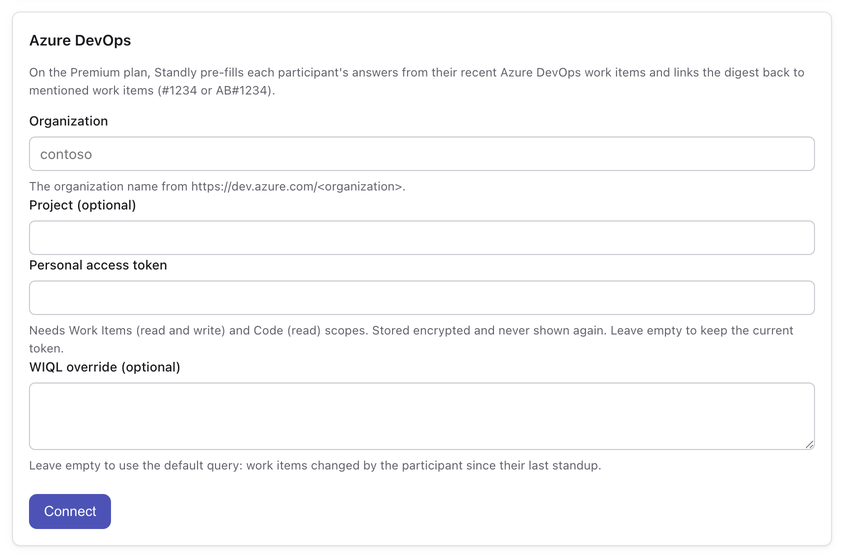
Each standup can be linked to one Azure DevOps organization from the Standly tab in the Teams channel. A link has four fields:
- Organization: the name in
dev.azure.com/<organization>. - Project: optional for pre-fill, required for write-back, since work item comments are posted through a project.
- Personal access token: see the scopes below. Standly checks the token against Azure DevOps before saving it.
- WIQL query: optional. Leave it empty to use the default query, work items changed by the participant since their last standup.
Personal access token scopes
Create a token in Azure DevOps under User settings, Personal access tokens, with these scopes:
- Work Items: Read & write, to read the work items for pre-fill and to post comments.
- Code: Read, to read pull requests.
The token is stored encrypted with AES-256-GCM, decrypted only in memory when Standly calls Azure DevOps, and never shown again in the tab. Standly contacts Azure DevOps only to read the activity used for pre-fill and to write back the notes participants ask it to write. Personal access tokens are the only sign-in method today.
Pre-fill: the answer arrives drafted
When the standup questions arrive in a participant's private Teams chat, the first question about past work (by default, What did you do?) is already filled in. Standly runs the WIQL query for that person, takes up to 50 work items changed since their last standup (or the last 24 hours on their first one), and lists each with its id, title and state. The participant edits the draft or submits it as is.
Drafted answer in the Teams card
Closed/updated:
- #4821 Retry failed webhook deliveries (Resolved)
- #4830 Log webhook response bodies (Active)
What the participant sends
Closed/updated:
- #4821 Retry failed webhook deliveries (Resolved)
- #4830 Log webhook response bodies (Active)
Paired with Ana on the staging rollout.
Write-back: notes land on the work item
Mention a work item in any answer and, after the digest is posted to the channel, Standly adds the participant's note to that work item as a comment. Both spellings work:
AB#1234, the Azure Boards mention syntax, in any letter case.#1234, the short form.
Each work item gets one comment per answer, however many times it is mentioned. The comment names the person and the standup date, followed by their answers on one line, cut at 280 characters. Pre-filled drafts list work items as #1234, so sending a draft unchanged adds a comment to every work item in it.
Before: the answers in Teams
What did you do?
Shipped the retry for AB#4821.

What will you do?
Finish #4830, then review Ana's PR.

Any blockers?
None
After: the comment on work items 4821 and 4830
Maria Costa standup 2026-09-14: Shipped the retry for AB#4821. Finish #4830, then review Ana's PR. None
Anyone opening work item 4821 in Azure Boards sees what was said about it in standup, without scrolling back through a Teams channel.
What else Premium adds
- Digest summary: two to four factual sentences at the top of each channel digest naming the shared themes and the blockers.
- Participation analytics: runs, answers expected against answers received, and the response rate per standup and per person over the last 14 days.
Everything else, local-time prompts, the one reminder, the channel digest and history, is on every plan. Teams that do not link Azure DevOps never see any of this. See pricing.
Other standup bots that read Azure DevOps
Standly is not the only standup bot with Azure DevOps support. Checked on each vendor's site on 2026-09-13:
- ScrumGenius runs in Slack, Microsoft Teams, Webex and email. An Azure DevOps service hook records Azure Repos pushes and Azure Boards work item changes on its team activity page, next to the check-in answers, and users can pick their assigned work items to reference in an answer. It also connects to Jira, GitHub, GitLab and others. (source, source)
- Steady runs in Slack and Microsoft Teams. It syncs commits, pull requests and work items from Azure Repos and Azure Boards into each developer's check-in, and also integrates with Jira, GitHub, Linear and others. Its Teams reminder opens the Steady web app through a magic link, where the check-in is written. (source, source)
Neither documents writing notes back to work items. That is where Standly differs: each person's note lands as a comment on the work items they mention, and the answer is written in the Teams chat. Pick ScrumGenius or Steady if your organization also runs Slack, or tracks work in Jira or GitHub next to Azure DevOps: Standly supports neither. The roundup of standup bots for Microsoft Teams covers more tools.
Try it on your project
Standly is coming to the Microsoft Teams store. Until then, request early access and we reply within two business days. Premium starts with a one-month free trial.