 Standly
The standup bot for Microsoft Teams.
Standups without the meeting.
Standly is an async standup bot for Microsoft Teams, made by out:grow. It asks each teammate the standup questions in a private Teams chat at their local time, sends one reminder, and posts one digest to the channel with blockers flagged. On Premium it drafts answers from Azure DevOps work items and pull requests and writes notes back to them.
Free for teams up to 10 people. Paid plans start with a one-month free trial.
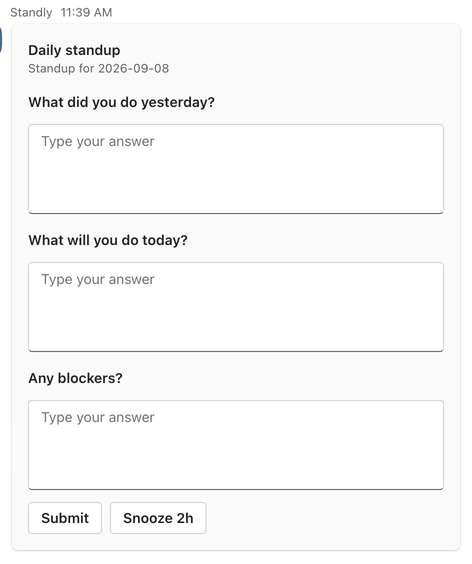
This is what shows up instead. Three questions, in a private chat, at 9:00 your time. Answer, press Submit, get on with your day.
- Built on Teams with Bot Framework and Adaptive Cards
- Azure DevOps pre-fill and write-back
- Local-time prompts with daylight saving handled
- Works in Teams on desktop, web and mobile
One standup day, start to finish.
An example for a team that sends the questions at 9:00 and posts the digest at 5:00 PM. Every value here is a setting on the standup.
-
Lisbon, and also Singapore
The questions arrive in a private chat.
9:00 in Lisbon is 9:00 in Singapore. Standly worked out everyone's send time in advance, daylight saving included, so nobody's standup lands in the middle of their night. Type the answers on the card and press Submit, or press Snooze 2h and get it again later.
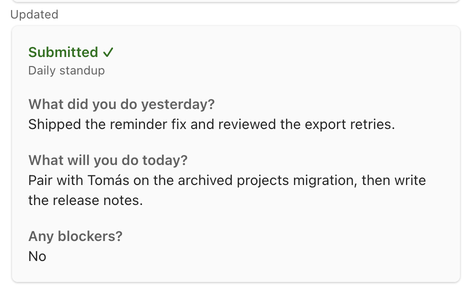
After Submit, the card flips to Submitted with your answers. -
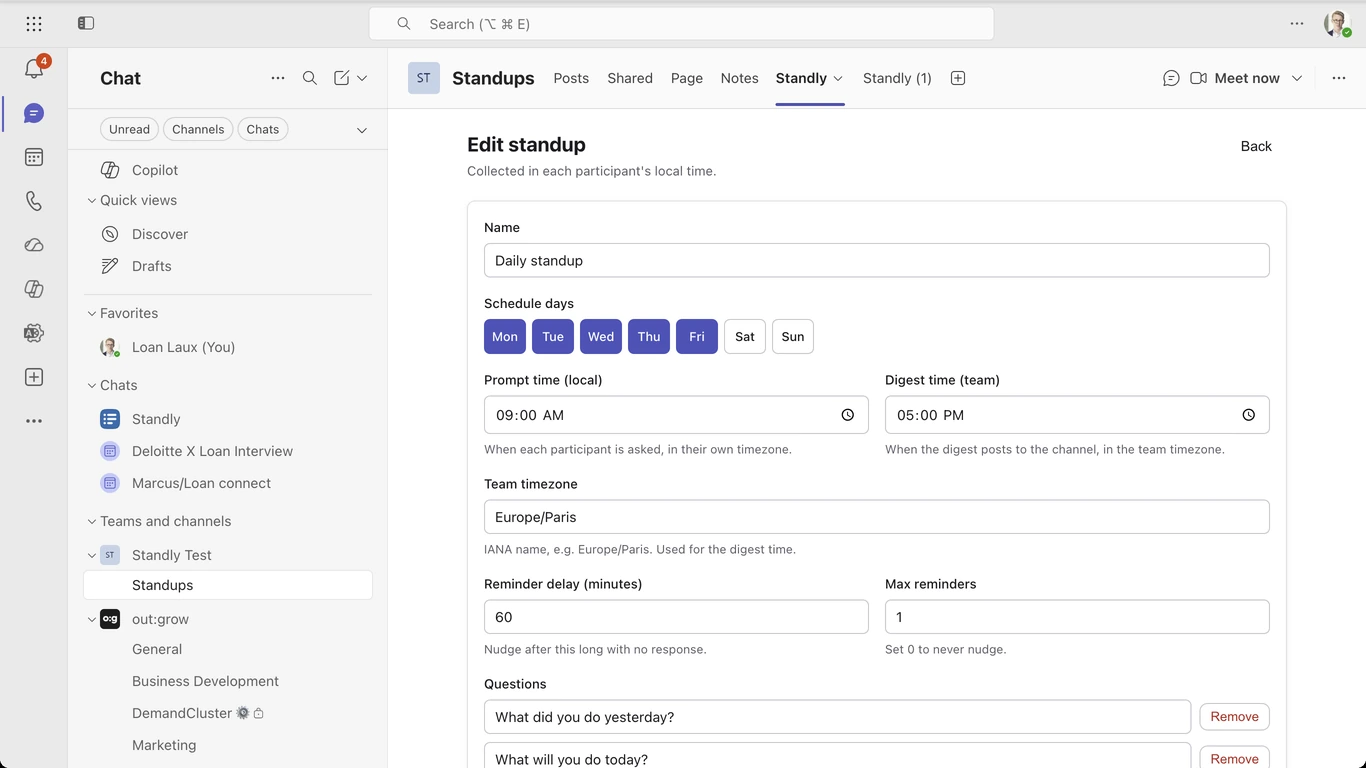
Reminder delay: 60 minutes
One reminder. Then Standly leaves you alone.
Anyone who has not answered gets a single nudge with two buttons, Fill it in now and Snooze 2h. That is the entire reminder policy. Nobody gets spammed, and nobody gets to say they were never asked.
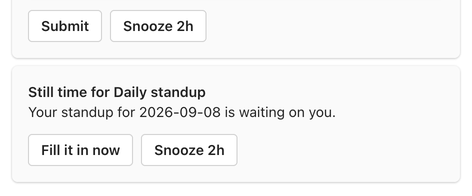
The one reminder. -
Team timezone
One digest in the channel.
Every answer under the person's name, blockers highlighted in red, and a Waiting on line naming anyone who skipped. The whole team reads it in a minute. Gentle peer pressure, included.
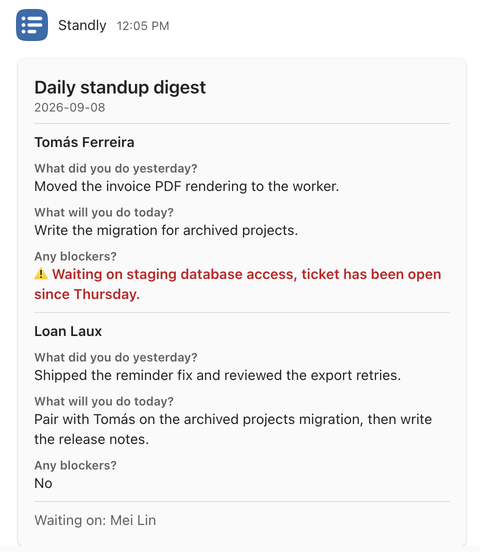
The digest, posted to the channel by Standly.
The scheduler runs every five minutes, so a prompt set for 9:00 can arrive at 9:04. Close enough for a standup.
Set up your first standup from the Teams tab. Name, people, schedule, questions, done.
Everything a standup needs, on every plan.
Standly does one job well. Here is the full list, including the boring parts.
Local-time prompts
Each participant gets the questions in a private chat at their own send time. On first contact the bot asks each person to confirm their timezone with one tap.
One reminder, one snooze
Non-responders get a single nudge after a delay you choose. Everyone can push a prompt back two hours.
A digest people read
One channel message per run. Answers grouped by person, blockers highlighted, and the names of anyone who did not answer.
Configured in a tab
Standups, participants from the channel roster, schedule, questions and history live in a Teams tab. No chat commands to memorise.
Ordinary Teams messages
The prompt and the digest are normal Teams messages, so they work on desktop, web and mobile with nothing extra to install.
As many standups as you need
Each standup belongs to one channel and has its own participants, schedule, reminder delay and questions. The defaults are What did you do? What will you do? Any blockers?
History in the tab
Every run's answers are kept per standup. The last 30 days on Free, the full history on Core and Premium.
A clean uninstall
Removing Standly from a team stops every prompt and digest for that team and deletes its data.
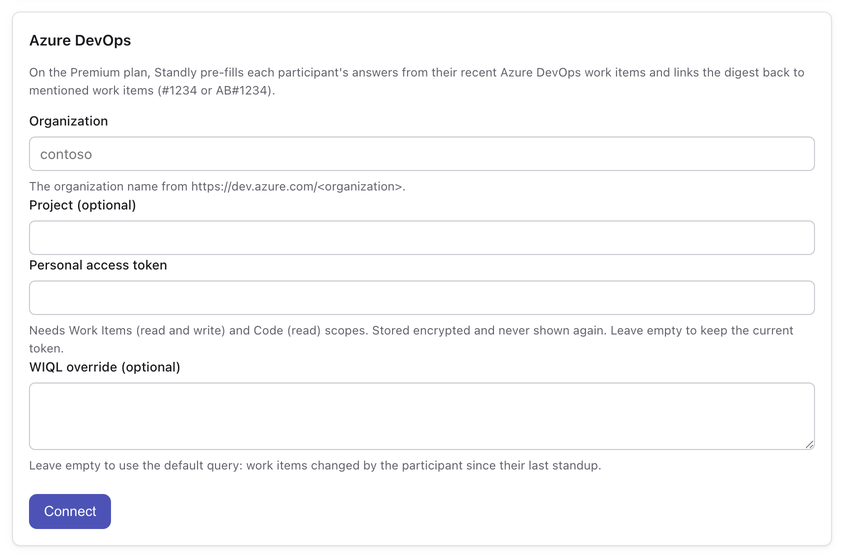
On Azure DevOps? Your standup arrives half written.
On the Premium plan, link a standup to your Azure DevOps organization and Standly does the paperwork on both ends. Teams that do not use Azure DevOps never see any of this.
Pre-fill
What did you do? arrives already drafted from the work items you changed since your last standup, plus merged pull requests. Edit it or send it as is.
Write-back
Mention AB#1234 or #1234 in an answer and the note lands on that work item as a comment after the digest.
Digest summary
Two to four factual sentences at the top of each digest naming the shared themes and the blockers, for the person who only has time to read the top.
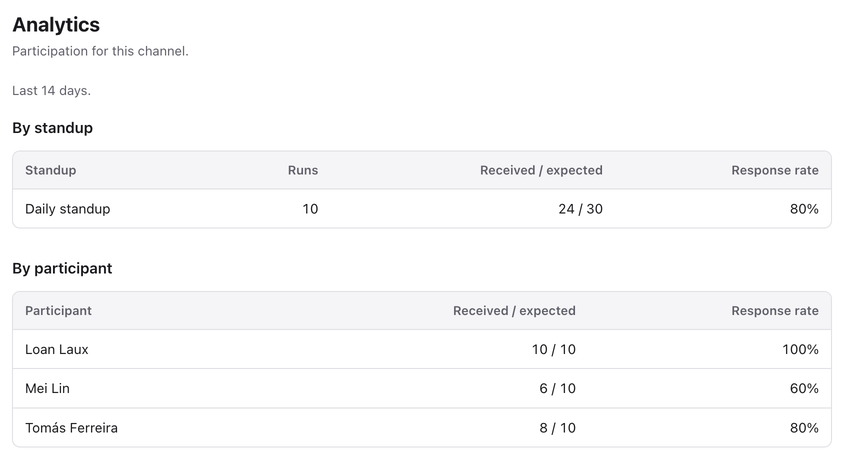
Participation analytics
Per standup and per person over the last 14 days: runs, answers expected against answers received, and the response rate.
$5 per active participant per month, with a one-month free trial.
Most standup bots started on Slack.
Geekbot and Standuply began as Slack bots and added Teams later, and DailyBot covers Slack, Teams, Google Chat and Discord. DailyBot and Standuply integrate with Jira and GitHub, and none of the three lists Azure DevOps. Standly runs only in Teams and connects to Azure DevOps.
| Criterion | Geekbot, DailyBot, Standuply | Standly |
|---|---|---|
| Chat platforms | Slack and Teams, DailyBot also Google Chat and Discord | Microsoft Teams only, built on Bot Framework and Adaptive Cards |
| Dev tool integrations | Jira and GitHub on DailyBot and Standuply, no Azure DevOps | Azure DevOps: pre-fill and write-back |
| Beyond standups | Polls, surveys, retros or kudos, depending on the tool | Standups only |
Free for teams up to 10 people. Or read the comparison of nine standup bots for Teams.
Free for teams up to 10. Then a few dollars a seat.
Billed per active participant: one distinct person across all your standups. The same person in three standups counts once.
Free
$0
Up to 10 active participants
- Unlimited standups
- Local-time prompts, one reminder, snooze
- Channel digests with blockers flagged
- Configuration tab
- Last 30 days of response history
Core
$2.50$25
Per active participant per monthPer active participant per year
- Everything in Free
- No participant cap
- Full response history
- One-month free trial
Premium
$5$50
Per active participant per monthPer active participant per year
- Everything in Core
- Azure DevOps pre-fill and write-back
- Digest summary
- Participation analytics
- One-month free trial
Planned launch pricing. Purchases will go through the Microsoft commercial marketplace once the listing is live, billed to the tenant you already pay Microsoft with. Full pricing details.
What Standly stores, in plain words.
Delegated permissions only
User.Read and offline_access. The channel roster comes from the Teams bot API, so no directory permission is requested.
Encrypted at rest
Conversation references and Azure DevOps tokens are encrypted with AES-256-GCM and decrypted only in memory when needed.
Uninstall means delete
Removing Standly from a team removes that team's standups, responses, digests and Azure DevOps links. Email support@standly.io for earlier deletion.
Three sub-processors
Vercel for hosting and the scheduler, Neon for Postgres, Microsoft for Teams. No advertising use and no selling of data.
The full text is in the privacy policy.
Questions people ask before installing.
Does it work on mobile?
Yes. The prompt and the digest are normal Teams messages, so they work in Teams on desktop, web and mobile. There is nothing to install on a phone.
Does my admin need to approve it?
Standly asks only for delegated permissions (User.Read and offline_access). Depending on your tenant's settings, an admin may need to consent once on first use.
What counts as an active participant?
One distinct person across all your standups. The same person in three standups counts once.
How much history do you keep?
Free shows the last 30 days per standup in the tab. Core and Premium keep the full history.
Can non-developers use it?
Yes. The Azure DevOps features only appear when a standup is connected to Azure DevOps. Every other team gets the same prompts, reminders and digest.
Is Standly a Geekbot alternative for Microsoft Teams?
Yes, for teams that work in Microsoft Teams. Geekbot, DailyBot and Standuply run in Slack as well as Teams, and DailyBot and Standuply integrate with Jira. Standly runs only in Teams, keeps the whole standup inside Teams chats and channels, and integrates with Azure DevOps. If your organization also uses Slack or Jira, one of those tools is the better fit. See Standly and Geekbot compared or the roundup of standup bots for Teams.
Does Standly work with Azure DevOps?
Yes, on the Premium plan. Link a stand-up to your Azure DevOps organization with a personal access token. Standly drafts each person's What did you do? answer from the work items they changed since their last standup, and writes their notes back as comments on the work items mentioned as #1234 or AB#1234. How the Azure DevOps integration works.
Is this the Standly standup bot for Slack?
No. Standly at standly.io runs only in Microsoft Teams, is made by out:grow, and is unrelated to other products named Standly.
Do you support Jira, GitHub or Slack?
Not today. GitHub is the first planned addition.
What happens when we uninstall it?
All prompts and digests stop and the team's data is removed. Email support@standly.io for earlier deletion.
How do I get it?
Standly is coming to the Microsoft Teams store. Until then, request early access and we reply within two business days.
Who makes Standly?
Standly is built by out:grow, the team behind WorldTimeFinder Pro for Microsoft Teams. The DST-correct timezone engine that puts your 9:00 prompt at 9:00 in every city was built for WorldTimeFinder first.
Cancel tomorrow's standup meeting.
Tell us your team's name and roughly how many people would take part. We reply within two business days.
Free for teams up to 10 people. Paid plans start with a one-month free trial.